
AAA Mobile
American Automobile Association, Inc.Lifestyle
4.525.14K Reviews
- Version
- 26.14.0
- Installs
- 10.00M
- Age Rating
- Everyone
Screenshots
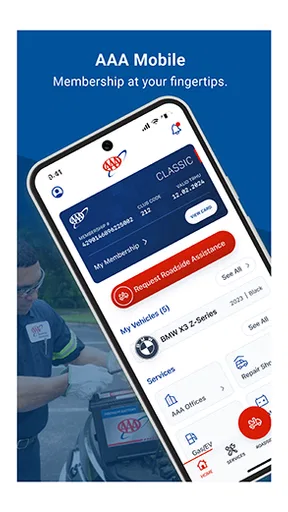
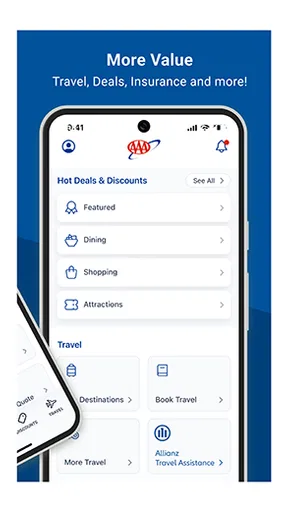
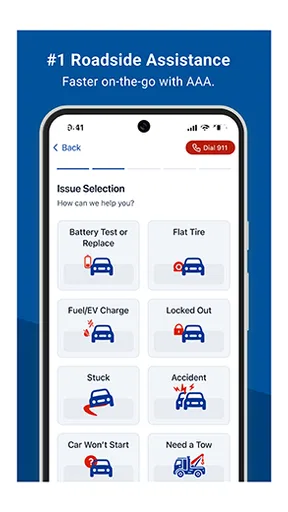
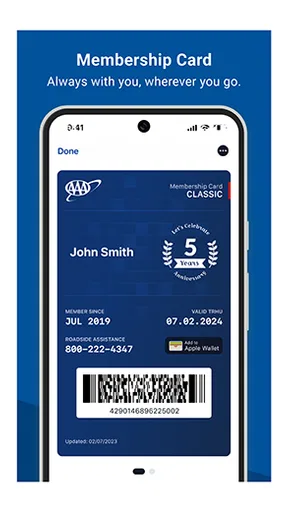
Our Review of AAA Mobile
 Analysis by Appyee
When I need roadside help, a nearby fuel stop, or a quick way to manage an automobile-club service while I am away from home, I prefer having one dependable starting point instead of searching through several unrelated apps. That is the role AAA Mobile tries to fill. I tested it as a practical lifestyle app rather than as something I would open for entertainment, and its value becomes clearest when it is prepared before a problem occurs.
The app comes from American Automobile Association, Inc. and is free to install. It is aimed at everyone, which makes sense because its main purpose is straightforward access to familiar AAA services while traveling or handling ordinary car-related needs. It has been available since August 10, 2010, and the current version is 26.11.0 for devices running at least iOS or Android 8.1, depending on the platform. That long presence also explains why it feels more like a service companion than a flashy new travel tool.
How I use AAA Mobile in an ordinary week
My baseline workflow is simple. I open the app when I want to find the relevant AAA service, check what is available around my current location, or begin a request without having to remember which page or phone number I need. The important habit is not waiting until the car has already stopped on the roadside. I would sign in, review the account area, and make sure the app is ready while I still have a reliable connection and enough battery.
That preparation changes the experience. In a calm moment, I can look around the interface and understand where assistance begins, where location information is entered, and where general member services are found. During a stressful moment, I do not want to experiment with every menu. The best way to use AAA Mobile is as a prepared tool, not an emergency download.
A realistic example is a weekend drive where the car starts showing a warning light at a shopping center. I would first move somewhere safe, then use the app to identify the appropriate assistance path rather than searching the web for a random towing company. If the situation is not urgent, I can also use it to locate useful nearby automotive or travel-related services before deciding what to do next. The app does not remove the need for judgment, but it reduces the number of disconnected steps.
For a member who already relies on AAA, this centralization is the main attraction. Instead of treating roadside service, travel planning, and other membership-related tasks as separate problems, I get a common entry point. That does not mean every task is equally quick. Some actions naturally require account details, location information, or additional confirmation, so the app is most helpful when I know what I am trying to accomplish before opening it.
What I check before leaving home
Before a longer trip, I would open AAA Mobile and confirm that the account is accessible. I would also make sure the phone can provide a usable location if I need assistance later. This is a small but important distinction: an app can help request service, but it cannot make a dangerous roadside position safe. I still keep the vehicle in a secure place, use hazard lights when appropriate, and follow local safety guidance.
I also treat the app as a convenience layer rather than my only travel plan. A low battery, weak signal, or a locked account can turn a normally easy workflow into a frustrating one. Keeping the usual AAA contact route available is sensible, especially for someone traveling through areas where connectivity may be inconsistent. This is not a criticism unique to AAA Mobile; it is simply the trade-off of putting a service workflow on a phone.
Another useful habit is checking the map or service information before starting a trip, not just after a problem appears. That gives me a better sense of what the app can show in my area and helps me recognize the correct screens later. It also prevents a common mistake: assuming that a general map result and a service request are the same thing. I use the first to understand options and the second only when I am ready to provide the information needed for assistance.
Settings and account details worth reviewing
There are no settings I would blindly change just because they exist. I focus on the ones that affect speed and accuracy: account access, location behavior, notification preferences, and the app’s permission choices. Location access is especially practical for roadside workflows, since manually describing a position beside an unfamiliar road is harder than allowing the phone to provide a starting point.
I prefer reviewing location permissions before a trip rather than granting them under pressure. If the app is unable to use location when I need it, I would check the phone’s system settings and confirm that the permission has not been restricted. At the same time, I would not leave every permission enabled without a reason. The right balance is to allow what supports the service I actually use and keep other choices under control.
Notifications deserve a similar review. Useful alerts should remain visible, but excessive notifications can make important messages easier to miss. I would keep service-related communication available and reduce anything that does not help my normal routine. The exact options can vary by device and app release, so I judge them by whether they make a real difference to my use rather than by trying to create a perfect configuration.
Signing in before a trip is another setting-like task that pays off later. If the app offers account-based services, I would not assume that installing it alone completes the setup. I would open the relevant area, verify that my membership information is recognized, and make sure I understand how to start a request. This is one of the less obvious advantages of a repeatable habit: I discover account friction at home, where it is easy to solve.
Shortcuts that make repeat visits less stressful
My fastest pattern is to use the app for one clear job at a time. If I need roadside assistance, I go directly toward that service instead of browsing travel information first. If I am looking for a nearby option, I begin with the location-based view and only then decide whether I need a formal request. Keeping those paths separate avoids unnecessary taps and reduces the chance of starting the wrong process.
I would also keep the app in a familiar place on the phone rather than burying it in a rarely opened folder. That sounds basic, but emergency tools are judged by retrieval time. A home-screen position, a remembered app-library location, or a phone shortcut that I already use can matter more than a collection of advanced options. I do not count on a clever shortcut unless I have tested it myself on the device I carry.
For families, the useful pattern is agreeing in advance about who will use the account and who will provide the vehicle and location details. When several people share a car, confusion can arise if one person has the app but another has the membership information. I would make sure the likely driver knows where AAA Mobile is and understands the basic request flow. That preparation is more reliable than assuming someone will learn it beside a disabled vehicle.
Frequent travelers can also create a simple pre-drive checklist: phone charged, account accessible, location available, and the app recently opened. I would not turn this into a complicated maintenance ritual. The point is to make the same few checks every time, especially before unfamiliar routes. Experienced use is less about discovering secret controls and more about removing predictable delays.
Where the app is stronger than ordinary alternatives
The usual alternative is searching the web, calling a general number, or keeping several local service apps installed. Those methods can work, but they divide attention. A web search may produce businesses that are nearby without being the right choice for a member’s situation. A phone call can be useful, yet it may require explaining account and location details from the beginning. AAA Mobile gives existing AAA users a more consistent place to start.
It is also more relevant than a generic navigation app when the goal is membership service rather than simply finding a road or business. Navigation apps are excellent for directions and broad local discovery, but they are not designed around the relationship between a AAA member and AAA assistance. I would use navigation for route guidance and AAA Mobile for AAA-specific service access, rather than expecting one app to replace the other.
That distinction matters when plans change. Suppose I am driving through an unfamiliar town and need help with the car. A general map may show repair shops, but I still have to decide which one to contact and whether it fits my membership needs. The AAA app gives me a more appropriate first step. The trade-off is that it is not a universal automotive marketplace, so a driver without AAA membership or someone seeking broad independent-shop comparisons may prefer a different tool.
Limits that experienced users should understand
AAA Mobile is not a substitute for every roadside or travel application. Its usefulness depends heavily on whether I am already part of the AAA ecosystem and whether the service I need belongs within that relationship. Someone who only wants fuel-price comparisons, detailed route planning, or a broad catalog of unrelated automotive providers may find a specialized app more focused.
I also would not expect the app to solve every emergency instantly. A request can still depend on accurate location information, account recognition, communication with the service process, and conditions outside the app. If I am in immediate danger, I handle safety first and use emergency services when appropriate. The app is for accessing AAA support, not for replacing emergency response.
Another limitation is the possibility of friction on older or tightly restricted devices. The minimum operating-system requirement is 8.1, so anyone using an older phone should check compatibility before relying on it. Even on a supported phone, battery-saving settings, disabled location access, or poor connectivity can affect the experience. I consider those practical conditions part of the setup, not evidence that the app itself is unusable.
The interface can also feel more functional than elegant. That is acceptable for a service app, but people expecting the polish of a dedicated navigation product may find the experience less focused. The app has several kinds of AAA-related information and actions, so a first-time user may need a little orientation. I would rather spend that orientation time before a trip than during a breakdown.
Who should install it and who can skip it
I recommend AAA Mobile to active AAA members who drive regularly, travel by car, or want a convenient mobile doorway to services they already trust. It is particularly useful for households with multiple drivers, people who take longer road trips, and anyone who dislikes searching for assistance under pressure. The free price removes the installation barrier, although the value naturally depends on having a reason to use AAA services.
I would be less enthusiastic for someone who is not a AAA member and has no intention of using AAA-related support. That person may get more from a general navigation app, a vehicle manufacturer’s service app, or a local roadside provider. Likewise, a professional driver seeking specialized fleet tools should not assume this lifestyle app is designed for that workflow. The right question is not whether it can be installed, but whether AAA is already part of the driver’s plans.
The audience rating of Everyone makes the app approachable for a broad household, but that does not mean every feature will be equally relevant to every person. A teenager who rarely drives may never need it, while a parent managing several family trips could find it worthwhile. I judge it by the practical role it plays in the household, not by the simplicity of the store category.
What the adoption numbers suggest about confidence
AAA Mobile holds a 4.5 average from around 82 thousand ratings and has passed 10 million installs, with roughly 25 thousand written reviews. Those figures do not guarantee that every phone, region, or situation will feel identical, but they do suggest that the app has become a familiar option for a substantial number of drivers. I see that as reassuring for a service tool whose usefulness depends partly on people being willing to keep it available before they need it.
The long release history is also relevant. An app that has been around since 2010 has had time to become part of users’ established habits, even though individual screens and workflows can change. I would still pay attention after updates, especially if I depend on a particular route to request assistance. The current version, 26.11.0, is the one I would use today, but I would avoid assuming that an older tutorial or remembered screen will always match it exactly.
My verdict after building a repeatable routine
AAA Mobile works best when I treat it as a prepared membership tool: sign in early, review location and notification choices, learn the main service path, and keep a backup way to contact help. Those habits make a bigger difference than casual browsing. The app is not trying to replace every travel or automotive utility, and it should not be judged as though it were a full navigation suite.
For the right user, its strength is concentration. AAA members can begin with a service designed around their relationship with AAA instead of piecing together a solution from search results and unrelated apps. The weaknesses are equally clear: it can feel broad rather than specialized, it relies on the phone and connection working properly, and it offers limited value to people outside the AAA ecosystem.
My final recommendation is positive for drivers who already use AAA and want a dependable mobile starting point. I would install it before a road trip, test the account access, and make sure location settings behave as expected. If you only need directions or general local discovery, choose a dedicated navigation app instead. But if your goal is to keep AAA services close at hand, AAA Mobile earns its place through preparation, not gimmicks.
Privacy and Permissions
See what permissions an app requests and how it handles your data.
- Location
- approximate location (network-based), precise location (GPS and network-based)
- Phone
- directly call phone numbers
- Photos/Media/Files
- read the contents of your USB storage, modify or delete the contents of your USB storage
- Storage
- read the contents of your USB storage, modify or delete the contents of your USB storage
- Camera
- take pictures and videos
- Microphone
- record audio
- Other
- view network connections, pair with Bluetooth devices, expand/collapse status bar, full network access, change your audio settings, run at startup, control vibration, prevent device from sleeping
Verdict
Strengths of AAA Mobile
- Official news, videos, and updates keep fans informed about AAA wrestling.
- Easy access to event information, match details, and wrestler content.
- Mobile-friendly design makes browsing convenient on phones and tablets.
- Useful for following AAA content between live events and broadcasts.
- Free to download, with content available without buying a game.
Limitations of AAA Mobile
- Some features may depend on an active internet connection.
- Content availability can vary by region or event schedule.
- The app may send frequent promotional notifications.
- Older devices may experience slower loading or reduced performance.
- Some sections may offer limited value outside the AAA fan community.
Other Releases by American Automobile Association, Inc.
View All
AAA Auto Club
Lifestyle4.8
Similar Picks in This Category
View All
SmartThings
Samsung Electronics Co., Ltd.4.6

Google Home
Google LLC4.0

Pinterest4.2

Astrotalk - Talk to Astrologer
Astrology & Horoscope4.7

My Verizon
Verizon Consumer Group4.5

Samsung Wallet (Samsung Pay)
Samsung Electronics Co., Ltd.4.1
Frequently Asked Questions
What is AAA Mobile and what can I use it for?
AAA Mobile is the official mobile app for AAA members, designed to make roadside assistance and travel planning more convenient. After signing in, you can request help for problems such as a flat tire, dead battery, lockout, or towing, view your membership information, find nearby AAA-approved services, and access travel-related tools. Available features may vary by your regional AAA club and membership plan.
Do I need to be a AAA member to use AAA Mobile?
Some parts of AAA Mobile may be available without an active membership, such as browsing general information, locating certain services, or learning about AAA products. However, the main roadside assistance features generally require a valid AAA membership and an account connected to that membership. Before downloading, check whether your local AAA club supports the app and confirm that your membership details are accepted.
How do I request roadside assistance through AAA Mobile?
To request roadside assistance, open the app, sign in if required, choose the assistance option, and provide your current location and vehicle information. The app can use your phone’s location services to help identify where you are, while additional details can help the service provider reach you faster. Keep your phone available because AAA or the assigned provider may contact you with updates.
Does AAA Mobile track my location or require special permissions?
AAA Mobile may request access to your location, phone, notifications, and other device features depending on which tools you use. Location access is especially useful when requesting roadside assistance or finding nearby AAA services. You can manage these permissions in your Android or iOS settings, but limiting them may reduce the app’s ability to identify your position, send alerts, or provide location-based recommendations.
Is AAA Mobile free to download, and are there additional costs?
AAA Mobile is generally free to download from the official Android or iOS app store, but using the app does not automatically include a AAA membership. Membership fees, service limits, travel products, insurance options, and charges for assistance outside your plan may apply. Review your local AAA club’s terms before relying on the app, since benefits and pricing can differ by region.
